
221 lines
11 KiB
Markdown
221 lines
11 KiB
Markdown
# Print3r
|
|
|
|
## Introduction
|
|
|
|
**Print3r** is a command-line tool (without GUI) to print 3d parts (.gcode, .stl, .amf, .3mf, .obj, .off, .scad, .sscad, etc)
|
|
to 3d printers, utilizing a slicer of your choice (Slic3r, Slic3r PE, PrusaSlicer, SuperSlicer, CuraEngine 3.x, CuraEngine 4.x, CuraEngine 5.x, Cura 15.04 and a few more).
|
|
|
|
### Examples
|
|
```
|
|
print3r -p prusa-i3 print cube.scad
|
|
print3r -p ender3 -d /dev/ttyUSB1 print cube.stl
|
|
print3r preview cube.gcode
|
|
```
|
|
|
|
### Main Features
|
|
- **print** `.scad`, `.stl`\* or `.gcode` to 3d printers
|
|
- **slice** `.scad` or `.stl`\* saving `.gcode` without printing
|
|
- **preprocess parts** with `--scale=<x>,<y>,<z>`, `--rotate=<x>,<y>,<z>`, `--translate=<x>,<y>,<z>`, `--random-placement`, `--auto-center`, `--multiply-part=<n>`
|
|
- **use slicer-independent arguments** like `--temperature=<c>`, `--layer-height=<h>`, `--fill-density=<f>`, `--perimeters=<n>`, etc.
|
|
- **send Gcode** from command line arguments with **gcode** or console interactively with **gconsole** command
|
|
- **render Gcode** and sliced .stl, .scad into `.png` image with **render** command
|
|
- **preview Gcode** using `yagv` Gcode viewer with **preview** command
|
|
- **log** lists all past finished prints with all settings used
|
|
|
|
\*) `.stl` (ascii & binary), and preliminary `.amf` and `.obj` supported as well.
|
|
|
|
## Changelog
|
|
2022:
|
|
- 0.3.20: new `@revo-{yellow,red,blue,green,pink}` macros, `-o <output>` added
|
|
- 0.3.19: `--device/-d --printer/-p --slicer/-s` short-cuts added
|
|
- 0.3.18: support CuraEngine-5.x / cura5 better
|
|
- 0.3.17: adding locks for avoiding to print simulatenously to the same printer, better support for cura-slicer & CuraEngine 5.x
|
|
- 0.3.16: `--scad` with `--scad.`<var>=<val> to pass variables to OpenSCAD models, experimental support for `metatron-` and `enoch-slicer` (--slicer=`metatron` or `enoch`)
|
|
- 0.3.15: experimental support for voxgl-slicer (`--slicer=voxgl`)
|
|
|
|
2021:
|
|
- 0.3.14: experimental support for `lab-slicer` and `vox3l-slicer` (`--slicer=lab` or `vox3l`)
|
|
- 0.3.13: supporting webcams via `webcam=<url>[ <url2>...]` and `webcam_snap=<settings>[ <setting2>...]`
|
|
- 0.3.12: more printer info in log-file, firmware and `M501` output
|
|
- 0.3.11: experimental support for `zplus-slicer` (`--slicer=zplus`)
|
|
- 0.3.10: each successful(ended) logged print contains new or `--uid=...` uid (to track printed parts)
|
|
- 0.3.9: 'log' lists all finished prints, incl. search with term or reference (see help)
|
|
- 0.3.6: support for `--post=<post1>[,<post2>...]` and `--post_<post1>=proc %i -o %o`
|
|
- 0.3.5: experimental support for --slicer=cura-slicer & 5dmaker
|
|
- 0.3.4: --cols=<n> and --rows=<n> in case --multiply-part is used
|
|
- 0.3.3: experimental support for `--slicer=mandoline` added
|
|
- 0.3.2: experimental support for `--slicer=slicer4rtn` added
|
|
|
|
2019:
|
|
- 0.3.0: better pipeline of processing div. formats, preliminary 3mf and 3mj (new format) support
|
|
- 0.2.8: CuraEngine-4.2.0 support via `--slicer=cura4`, see wiki for install instructions
|
|
- 0.2.6: cleaner script-layer within Gcode processing, slic3r-*: better multi-extruder support `--toolmap` & `--toolremap`
|
|
- 0.2.5: preliminary `--slicer=prusa` support, additional inline functions support for gcode transformation: `&toolcolor(n,a,b,c,d,e)`, `&hsl2cmy(h,s,l)`, `&phases(n=2|3,p=3|4)`
|
|
- 0.2.3: support for `--prepend_gcode=...` for start-gcode addition, and `--layer-gcode=...`
|
|
- 0.2.2: support for `skirts`, `brims` and `rafts`, `support` and `seam` slicer-independent
|
|
|
|
2018:
|
|
- 0.2.0: `client` command added, and `--device=tcp:<remote-ip>[:<n>]` added for remote printing capabilities
|
|
- 0.1.8: proper cleanup of temporary files (incl. CTRL-C abort)
|
|
- 0.1.7: more slicer-independent speed settings (`print/travel/infill/perimeter/small_perimeter/bridge/retract_speed`)
|
|
- 0.1.6: restructure the file layout of settings (e.g. at `/usr/share/print3r` & `~/.config/print3r/`)
|
|
- 0.1.5: new option `--scad=<code>` to additionally execute openscad code
|
|
- 0.1.4: various improvements, remap() of general settings to slice-specific settings via `.../<slicer>/map.ini`
|
|
- 0.1.1: better support for `--slicer=cura` and `cura-legacy`
|
|
- 0.1.0: `--slicer=<slicer>` with `--printer=<profile>` leads to `../<slicer>/<profile>`, `@<setting>` leads to `settings/macro/<setting>`
|
|
- 0.0.9: preliminary `.amf` and `.obj` native support for preprocessing (scale,rotate,translate,mirror)
|
|
- 0.0.8: absolute scaling like `--scale=0,0,30mm` or `--scale=50mm`, and `--scale=50%` same as `--scale=0.5`, `--auto-center` to center print
|
|
- 0.0.7: `PRINT3R` enviromental variable considered, `'baudrate=auto'` probes baudrate.
|
|
- 0.0.6: publically released source on github
|
|
|
|
### To Do / Planned
|
|
- ~~slicer agnostic, e.g. support of CuraEngine (just the slicer)~~: done since 0.1.6 with `slic3r`, `slic3r-pe`, `cura-legacy` and `cura`
|
|
- ~~network connectivity, distributed printing via tcp/ip~~: done since 0.2.0 with `client` command and `--device=tcp:<remote-ip>[:<n>]` (n=0 (default),1,2 etc)
|
|
- ~~preview gcode in OpenGL/WebGL zoomable views~~: done with 0.1.6 via external [`yagv` viewer](https://github.com/Spiritdude/yagv)
|
|
- multiple extruder support (preferably slicer-independent)
|
|
|
|
## Platform
|
|
Primary focus in on **Linux** (Debian, Ubuntu) and alike platforms like FreeBSD and such.
|
|
|
|
## Requirements
|
|
- install `openscad`, see [OpenSCAD.org](http://www.openscad.org/)
|
|
- install `slic3r`, Debian/Ubuntu: `apt install slic3r`
|
|
- optional:
|
|
- recommended: [install Slic3r PE](https://github.com/Spiritdude/Print3r/wiki/Print3r:-Slic3r-&-Slic3r-PE)
|
|
- recommended: [install CuraEngine](https://github.com/Spiritdude/Print3r/wiki/Print3r:-Cura)
|
|
- [install CuraEngine Legacy](https://github.com/Spiritdude/Print3r/wiki/Print3r:-Cura-Legacy)
|
|
- recommended: [install FreeCAD2Any](https://github.com/Spiritdude/FreeCAD2Any) which supports FCStd, IGES, STEP and Brep import as well
|
|
|
|
## License
|
|
The software is licensed under GPLv3
|
|
|
|
## Download
|
|
```
|
|
git clone https://github.com/Spiritdude/Print3r
|
|
cd Print3r
|
|
```
|
|
## Install
|
|
```
|
|
make requirements
|
|
make install
|
|
```
|
|
|
|
### Printer Configurations
|
|
See [Profiles](https://github.com/Spiritdude/Print3r/wiki/Print3r:-Profiles) how to setup a dedicated printer profile.
|
|
|
|
## Usage
|
|
```
|
|
Print3r (print3r) 0.3.20 USAGE: [<options>] <cmd> <file1> [<...>]
|
|
|
|
options:
|
|
--verbose or -v or -vv increase verbosity
|
|
--quiet or -q no output except fatal errors
|
|
--baudrate=<n> set baudrate, default: 115200
|
|
-b <n>
|
|
--device=<d> set device, default: /dev/ttyUSB0
|
|
-d <device>
|
|
--slicer=<slicer> set slicer, default: slic3r
|
|
-s <slicer>
|
|
5dmaker, cura, cura-legacy, cura-slicer, cura4, cura5, curax, enoch, goslice, kirimoto, lab, mandol
|
|
ine, metatron, prusa, slic3r, slic3r-pe, slicer4rtn, super, vox3l, voxgl, zplus
|
|
--printer=<name> config of printer, default: default
|
|
-p <name>
|
|
--version display version and exit
|
|
--output=<file> define output file for 'slice' and 'render' command
|
|
-o <file>
|
|
--scad consider all arguments as actual OpenSCAD code (not files)
|
|
--scadlib=<files> define OpenSCAD files separated by "," or ":"
|
|
by default 'use <file>', change with --scadimport=include
|
|
--prepend-gcode=... add manually start-gcode
|
|
--layer-gcode=... insert gcode at layer change
|
|
--display_update=off turn built-in display updates off
|
|
--post_<stage>=... define a post-processing stage (use '%i' input file, '%o' output file)
|
|
--post=<stage>[,<stage>] apply post-processing stage(s)
|
|
part preprocessing:
|
|
--random-placement place print randomly on the bed
|
|
--auto-center place print in the center
|
|
--multiply-part=<n> multiply part(s)
|
|
--rows=<n> define rows for multiplied parts
|
|
--cols=<n> define cols for multiplied parts
|
|
--scale=<x>,<y>,<z> scale part x,y,z (absolute if 'mm' is appended)
|
|
--scale=<f> scale part f,f,f
|
|
--rotate=<x>,<y>,<z> rotate x,y,z
|
|
--translate=<x>,<y>,<z> translate x,y,z
|
|
--mirror=<x>,<y>,<z> mirror x,y,z (0=keep, 1=mirror)
|
|
--uid=<id> define part unique id (default: auto generated uid)
|
|
--<key>=<value> include any valid slicer option (e.g. slic3r --help)
|
|
|
|
commands:
|
|
print <file> [...] print (convert & slice & print) part(s) (3mf, 3mj, 5mf, amf, brep, fcstd, iges, obj, off, step, stl)
|
|
slice <file> [...] slice file(s) to gcode (same formats as 'print')
|
|
preview <file> [...] slice & preview (same formats as 'print')
|
|
render <file> [...] render an image (use '--output=sample.png' or so)
|
|
gcode <code1> [...] send gcode lines
|
|
gconsole start gcode console
|
|
client map USB connected printer to network (per device)
|
|
log [<term>|<#num>] list log of finished prints, use -v for details or --format=json to dump JSON
|
|
use --output=<k>[,<k1>] to list particular keys
|
|
if num is negative, the last entries are shown, e.g. '#-5'
|
|
help
|
|
|
|
examples:
|
|
export PRINT3R "printer=my_printer" --OR-- setenv PRINT3R "printer=my_printer"
|
|
print3r slice cube.stl
|
|
print3r --layer-height=0.2 -o test.gcode slice cube.stl
|
|
print3r -p ender3 -d /dev/ttyUSB1 print test.gcode
|
|
print3r -p corexy -d /dev/ttyUSB2 --layer-height=0.3 --fill-density=0 print cube.stl
|
|
print3r -p ender3 -d tcp:192.168.0.2 --layer-height=0.25 print cube.stl
|
|
print3r print cube.scad
|
|
print3r print parametric.scad --scad.A=20 --scad.B=30
|
|
print3r --scad print "cube(20)"
|
|
print3r --scad print "cube(a)" --scad.a=20
|
|
print3r log
|
|
print3r --output=uid,layer_height log cube
|
|
print3r log -v '#12'
|
|
print3r gcode 'G28 X Y' 'G1 X60' 'G28 Z'
|
|
print3r gconsole
|
|
== Print3r: Gcode Console (gconsole) - use CTRL-C or 'exit' or 'quit' to exit
|
|
for valid Gcode see https://reprap.org/wiki/G-code
|
|
conf: device /dev/ttyUSB0, connected
|
|
> M115
|
|
...
|
|
|
|
```
|
|
|
|
## More Examples
|
|
```
|
|
print3r --fill-density=0 --layer-height=0.2 print cube.scad
|
|
print3r --print-center=100,100 print cube.scad
|
|
print3r --printer=ender3.ini --device=/dev/ttyUSB1 --random-placement --rotate=45,0,0 print cube.scad
|
|
print3r -p ender3.ini -d /dev/ttyUSB1 --random-placement --rotate=45,0,0 print cube.scad
|
|
print3r --multiply-part=3 --scale=50% print cube.scad
|
|
```
|
|
|
|
### Scaling Parts
|
|
```
|
|
print3r --scale=2 print cube.scad
|
|
print3r --scale=1,4,0.5 print cube.scad
|
|
print3r --scale=30% print cube.scad
|
|
print3r --scale=50mm print cube.scad
|
|
print3r --scale=0,0,30mm print 3DBenchy.stl
|
|
```
|
|
|
|
### Environment Variable `PRINT3R`
|
|
You can set any option into PRINT3R environment variable, "<key>=<value>", combined with ":", like:
|
|
```
|
|
export PRINT3R "printer=prusa-i3:temperature=190:..."
|
|
print3r print cube.scad
|
|
```
|
|
|
|
## Render Example
|
|
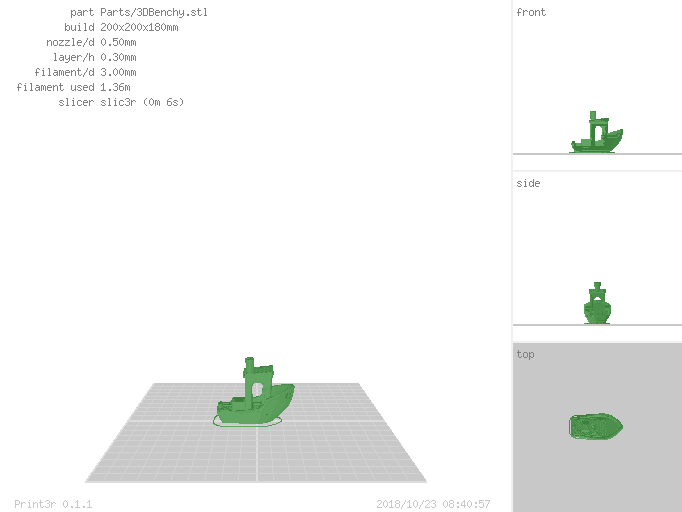
Instead to actually print parts, you can also let them render into .png image as well (e.g. for documentation purposes or preview):
|
|
```
|
|
print3r --output=benchy.png render 3DBenchy.stl
|
|
```
|
|
|
|
|
|
## See Also
|
|
- **[Print3r Wiki](https://github.com/Spiritdude/Print3r/wiki)**, detailed documentation
|
|
- [Spiritdude's Public Notebook: Print3r](https://spiritdude.wordpress.com/tag/print3r/)
|
|
|