
95 lines
4.2 KiB
Markdown
95 lines
4.2 KiB
Markdown
# Welcome to [Astro Ecommerce](https://www.creative-tim.com/astro)
|
|
|
|
 [](https://github.com/creativetimofficial/astro-ecommerce/issues?q=is%3Aopen+is%3Aissue) [](https://github.com/creativetimofficial/astro-ecommerce/issues?q=is%3Aissue+is%3Aclosed)
|
|
|
|
|
|
|
|
## Description
|
|
|
|
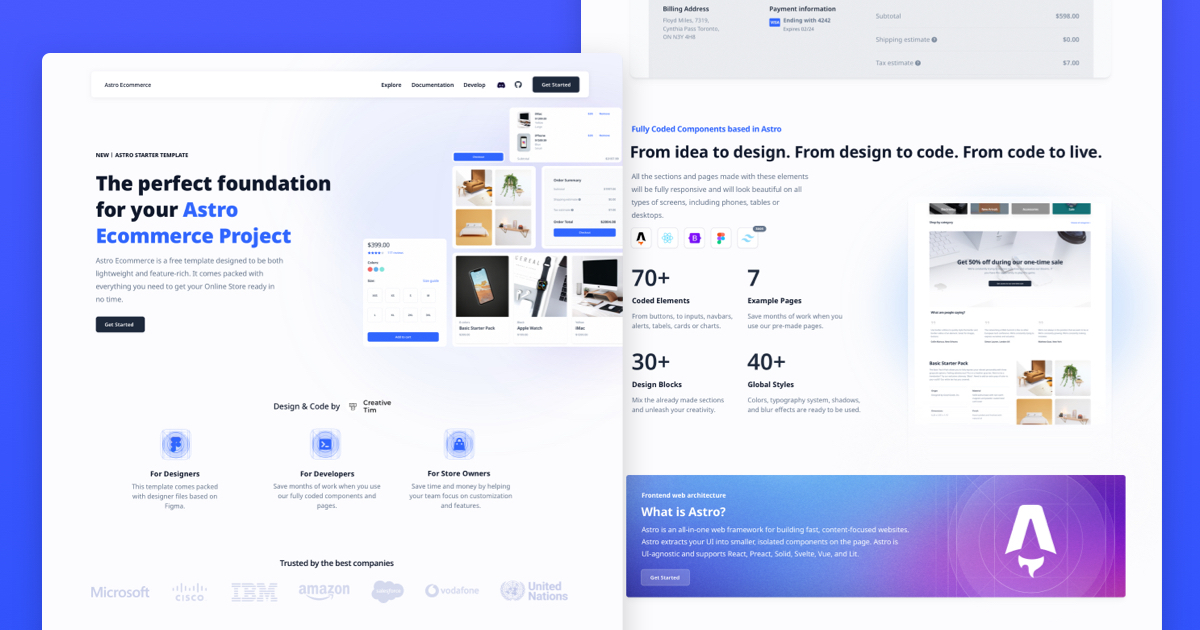
Introducing **Astro Ecommerce**, the ultimate starter template for your e-commerce web project. Built on Astro's next-gen island architecture, Astro Ecommerce offers a sleek and modern design with a wide range of components and features to help you create a stunning online store.
|
|
|
|
**Main Features**
|
|
Build your e-commerce website quickly and efficiently with:
|
|
- 70+ fully coded elements
|
|
- 3 fully coded example pages
|
|
- 30+ blocks
|
|
- Responsive design
|
|
|
|
**Example Pages**
|
|
We created a set of pre-built pages to help you get inspired or show something to your clients. See them below:
|
|
- [Landing Page](https://demos.creative-tim.com/astro-ecommerce/landing/): Designed to introduce the website's purpose and encourage the user to take an action.
|
|
- [Product Page](https://demos.creative-tim.com/astro-ecommerce/product/): It's designed to give the user all the information they need to make a purchase decision
|
|
- [Shopping Page](https://demos.creative-tim.com/astro-ecommerce/shopping-cart/): Includes a summary of the items in the cart and a form for billing and shipping information.
|
|
- more+
|
|
|
|
Astro Ecommerce has everything you need to create the e-commerce website of your dreams.
|
|
|
|
|
|
## 🚀 Project Structure
|
|
|
|
Inside of your Astro project, you'll see the following folders and files:
|
|
|
|
```
|
|
/
|
|
├── public/
|
|
│ └── favicon.svg
|
|
├── src/
|
|
│ ├── components/
|
|
│ │ ├── cart/
|
|
│ │ ├── checkout/
|
|
│ │ ├── incentives/
|
|
│ │ ├── order/
|
|
│ │ ├── products/
|
|
│ │ ├── promo/
|
|
│ │ ├── reviews/
|
|
│ │ ├── store/
|
|
│ │ ├── dashboardContext.tsx
|
|
│ │ ├── footer.tsx
|
|
│ │ └── navbar.tsx
|
|
│ ├── layouts/
|
|
│ │ └── Layout.astro
|
|
│ └── pages/
|
|
│ ├── index.astro
|
|
│ ├── landing.astro
|
|
│ ├── product.astro
|
|
│ └── shopping-cart.astro
|
|
├── package.json
|
|
├── README.md
|
|
└── tsconfig.json
|
|
```
|
|
|
|
Astro looks for `.astro` or `.md` files in the `src/pages/` directory. Each page is exposed as a route based on its file name.
|
|
|
|
There's nothing special about `src/components/`, but that's where we like to put any Astro/React/Vue/Svelte/Preact components.
|
|
|
|
Any static assets, like images, can be placed in the `public/` directory.
|
|
|
|
## 🧞 Commands
|
|
|
|
All commands are run from the root of the project, from a terminal:
|
|
|
|
| Command | Action |
|
|
| :--------------------- | :------------------------------------------------- |
|
|
| `npm install` | Installs dependencies |
|
|
| `npm run dev` | Starts local dev server at `localhost:3000` |
|
|
| `npm run build` | Build your production site to `./dist/` |
|
|
| `npm run preview` | Preview your build locally, before deploying |
|
|
| `npm run astro ...` | Run CLI commands like `astro add`, `astro preview` |
|
|
| `npm run astro --help` | Get help using the Astro CLI |
|
|
|
|
#### Social Media
|
|
|
|
Twitter: <https://twitter.com/CreativeTim>
|
|
|
|
Facebook: <https://www.facebook.com/CreativeTim>
|
|
|
|
Dribbble: <https://dribbble.com/creativetim>
|
|
|
|
TikTok: <https://tiktok.com/@creative.tim>
|
|
|
|
Instagram: <https://instagram.com/creativetimofficial>
|
|
|
|
## 👀 Want to learn more?
|
|
|
|
Feel free to check [our documentation](https://www.creative-tim.com/learning-lab/astro/overview/astro-ecommerce) or jump into our [Discord server](https://discord.com/invite/TGZqBvZB).
|